Applying transformers to columns

Why Column-Specific Transformers?

Different columns need different transformations:

  • StandardScaler works only on numeric columns
  • OneHotEncoder works only on categorical columns
  • Some columns need no transformation

Selection Operations

SelectCols and DropCols filter columns based on rules:

from skrub import SelectCols, DropCols
import pandas as pd

df = pd.DataFrame({
    "date": ["03 January 2023", "04 February 2023"],
    "city": ["Paris", "London"],
    "values": [10, 20]
})

SelectCols("date").fit_transform(df)
date
0 03 January 2023
1 04 February 2023
DropCols("date").fit_transform(df)
city values
0 Paris 10
1 London 20

Applying Transformers to Columns

ApplyToCols applies a transformer to selected columns:

from skrub import ApplyToCols
import skrub.selectors as s
from sklearn.preprocessing import OneHotEncoder

one_hot = ApplyToCols(OneHotEncoder(sparse_output=False), cols=s.string())
transformed = one_hot.fit_transform(df)
transformed
date_03 January 2023 date_04 February 2023 city_London city_Paris values
0 1.0 0.0 0.0 1.0 10
1 0.0 1.0 1.0 0.0 20

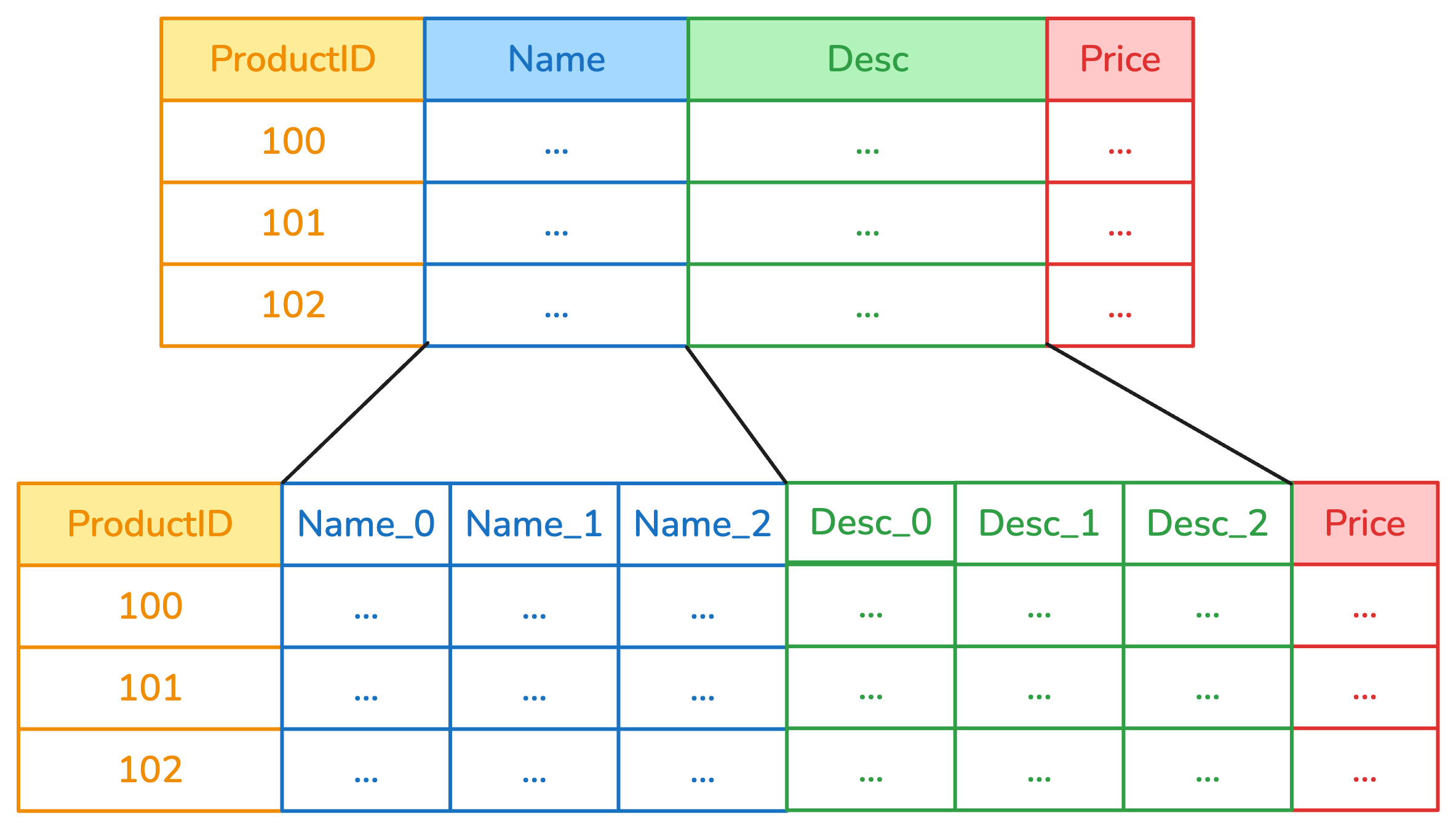
Example: ApplyToCols

example of ApplyToCols

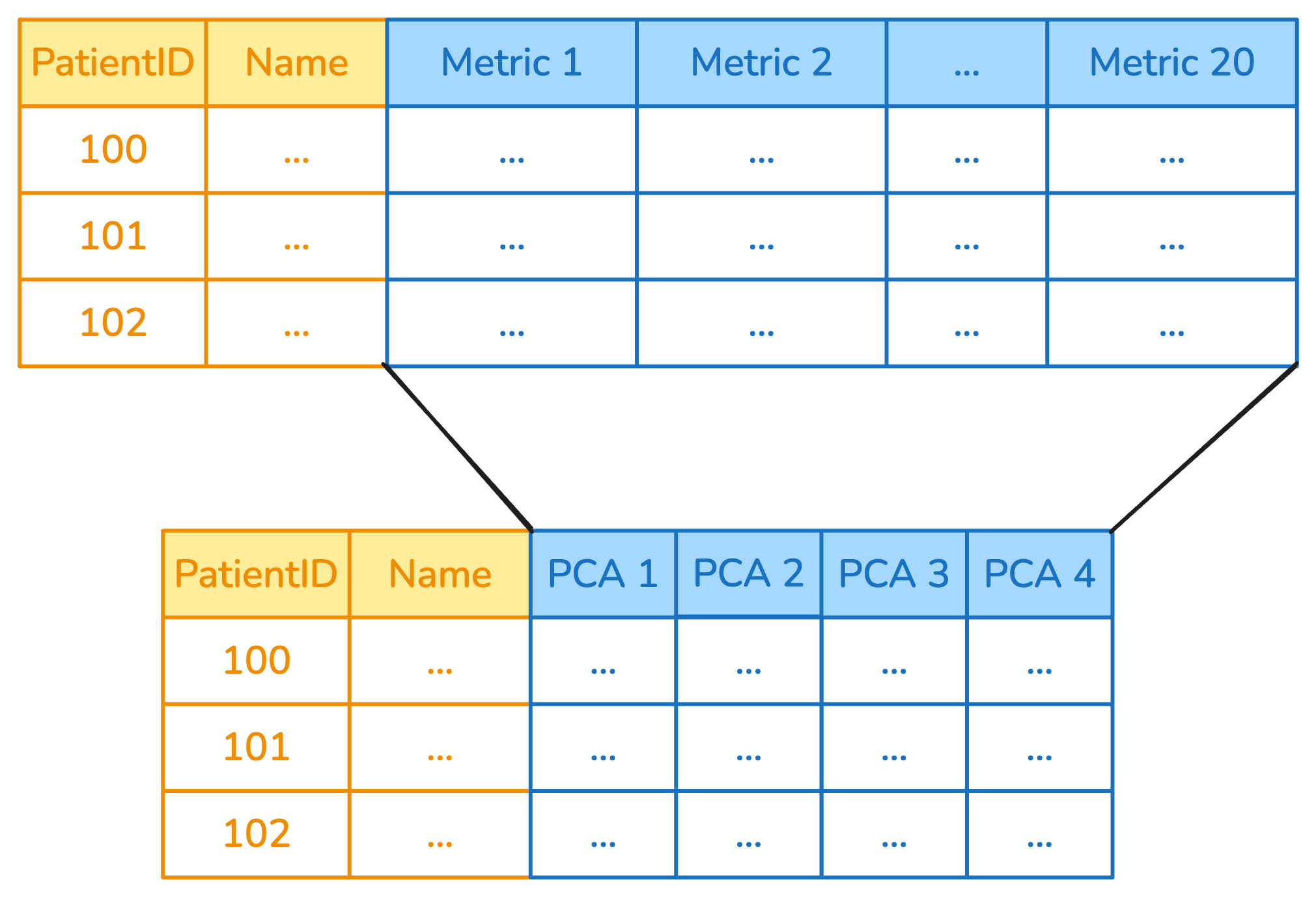
Applying to Multiple Columns: ApplyToFrame

ApplyToFrame applies a transformer to a subset of columns:

from skrub import ApplyToFrame
from sklearn.decomposition import PCA

reduce = ApplyToFrame(PCA(n_components=2), cols=s.glob("metric_*"))
df_reduced = reduce.fit_transform(df)
df_reduced
date city values
0 03 January 2023 Paris 10
1 04 February 2023 London 20

Example: ApplyToCols

example of ApplyToFrame

Important: new behavior in the next release

  • No ApplyToFrame anymore
  • ApplyToCols will automatically detect the transformer

The allow_reject Parameter

When allow_reject=True, columns that can’t be transformed are passed through:

from skrub import ApplyToCols, ToDatetime

with_reject = ApplyToCols(ToDatetime(), allow_reject=True)
result = with_reject.fit_transform(df)

The allow_reject Parameter

When allow_reject=False, columns that can’t be transformed raise an exception:

from skrub import ApplyToCols, ToDatetime

with_reject = ApplyToCols(ToDatetime(), allow_reject=False)
result = with_reject.fit_transform(df)
---------------------------------------------------------------------------
RejectColumn                              Traceback (most recent call last)
File ~/work/skrub-tutorials/.pixi/envs/doc/lib/python3.14/site-packages/skrub/_apply_to_cols.py:436, in _fit_transform_column(column, y, columns_to_handle, transformer, allow_reject, kwargs)
    435 try:
--> 436     output = transformer.fit_transform(transformer_input, y=y, **kwargs)
    437 except allowed:

File ~/work/skrub-tutorials/.pixi/envs/doc/lib/python3.14/site-packages/skrub/_single_column_transformer.py:171, in _wrap_add_check_single_column.<locals>.fit_transform(self, X, y, **kwargs)
    170 self._check_single_column(X, f.__name__)
--> 171 return f(self, X, y=y, **kwargs)

File ~/work/skrub-tutorials/.pixi/envs/doc/lib/python3.14/site-packages/skrub/_to_datetime.py:395, in ToDatetime.fit_transform(***failed resolving arguments***)
    394 if datetime_format is None:
--> 395     raise RejectColumn(
    396         f"Could not find a datetime format for column {sbd.name(column)!r}."
    397     )
    399 self.format_ = datetime_format

RejectColumn: Could not find a datetime format for column 'city'.

The above exception was the direct cause of the following exception:

ValueError                                Traceback (most recent call last)
Cell In[6], line 4
      1 from skrub import ApplyToCols, ToDatetime
      3 with_reject = ApplyToCols(ToDatetime(), allow_reject=False)
----> 4 result = with_reject.fit_transform(df)

File ~/work/skrub-tutorials/.pixi/envs/doc/lib/python3.14/site-packages/sklearn/utils/_set_output.py:316, in _wrap_method_output.<locals>.wrapped(self, X, *args, **kwargs)
    314 @wraps(f)
    315 def wrapped(self, X, *args, **kwargs):
--> 316     data_to_wrap = f(self, X, *args, **kwargs)
    317     if isinstance(data_to_wrap, tuple):
    318         # only wrap the first output for cross decomposition
    319         return_tuple = (
    320             _wrap_data_with_container(method, data_to_wrap[0], X, self),
    321             *data_to_wrap[1:],
    322         )

File ~/work/skrub-tutorials/.pixi/envs/doc/lib/python3.14/site-packages/skrub/_apply_to_cols.py:314, in ApplyToCols.fit_transform(self, X, y, **kwargs)
    312 parallel = Parallel(n_jobs=self.n_jobs)
    313 func = delayed(_fit_transform_column)
--> 314 results = parallel(
    315     func(
    316         sbd.col(X, col_name),
    317         y,
    318         self._columns,
    319         self.transformer,
    320         self.allow_reject,
    321         kwargs,
    322     )
    323     for col_name in all_columns
    324 )
    325 return self._process_fit_transform_results(results, X)

File ~/work/skrub-tutorials/.pixi/envs/doc/lib/python3.14/site-packages/joblib/parallel.py:1986, in Parallel.__call__(self, iterable)
   1984     output = self._get_sequential_output(iterable)
   1985     next(output)
-> 1986     return output if self.return_generator else list(output)
   1988 # Let's create an ID that uniquely identifies the current call. If the
   1989 # call is interrupted early and that the same instance is immediately
   1990 # reused, this id will be used to prevent workers that were
   1991 # concurrently finalizing a task from the previous call to run the
   1992 # callback.
   1993 with self._lock:

File ~/work/skrub-tutorials/.pixi/envs/doc/lib/python3.14/site-packages/joblib/parallel.py:1914, in Parallel._get_sequential_output(self, iterable)
   1912 self.n_dispatched_batches += 1
   1913 self.n_dispatched_tasks += 1
-> 1914 res = func(*args, **kwargs)
   1915 self.n_completed_tasks += 1
   1916 self.print_progress()

File ~/work/skrub-tutorials/.pixi/envs/doc/lib/python3.14/site-packages/skrub/_apply_to_cols.py:440, in _fit_transform_column(column, y, columns_to_handle, transformer, allow_reject, kwargs)
    438     return col_name, [column], None
    439 except Exception as e:
--> 440     raise ValueError(
    441         f"Transformer {transformer.__class__.__name__}.fit_transform "
    442         f"failed on column {col_name!r}. See above for the full traceback."
    443     ) from e
    444 output = _utils.check_output(transformer, transformer_input, output)
    445 output_cols = sbd.to_column_list(output)

ValueError: Transformer ToDatetime.fit_transform failed on column 'city'. See above for the full traceback.

In the next release: SingleColumnTransformer

The SingleColumnTransformer allows to define a transformer with custom rules:

from skrub.core import RejectColumn, SingleColumnTransformer
class ZipcodeParser(SingleColumnTransformer):
    def __init__(self):
        return
    def fit_transform(self, X, y=None):
        if any(X.map(len) != 5):
            raise RejectColumn('This transformer only takes zip codes of length 5.')
        else:
            # extract the first two characters
            letters = X.map(lambda s: s[:2])
            try:
                # extract the last 3 characters and try to convert to int 
                numbers = X.map(lambda s: int(s[2:]))
            except:
                raise RejectColumn('Input zip codes must consist of two letters followed by three numbers.')
            return(pd.DataFrame({'letters': letters, 'numbers': numbers}))

Chaining Transformers

Use scikit-learn pipelines to combine multiple transformers:

from sklearn.pipeline import make_pipeline
from sklearn.preprocessing import OneHotEncoder

select = SelectCols("department-name")
encode = ApplyToCols(OneHotEncoder(sparse_output=False))
reduce = ApplyToFrame(PCA(n_components=2))

transform = make_pipeline(select, encode, reduce)

Order Matters!

Transformers should be ordered carefully:

# Encode first, then scale
transform_1 = make_pipeline(
    ApplyToCols(OneHotEncoder(sparse_output=False), cols=s.string()),
    ApplyToCols(StandardScaler(), cols=s.numeric())
)

# vs. Scale first, then encode
transform_2 = make_pipeline(
    ApplyToCols(StandardScaler(), cols=s.numeric()),
    ApplyToCols(OneHotEncoder(sparse_output=False), cols=s.string())
)

What we have seen in this chapter

  • SelectCols / DropCols: Filter columns
  • ApplyToCols: Apply transformer to matching columns
  • ApplyToFrame: Apply transformer to subset, keep rest
  • SingleColumnTransformer: Create a transformer with custom rules
  • allow_reject: Skip incompatible columns
  • Chain transformers with scikit-learn pipelines