from sklearn.pipeline import make_pipeline
from sklearn.linear_model import LogisticRegression
from sklearn.preprocessing import StandardScaler
from sklearn.impute import SimpleImputer
from skrub import TableVectorizer

model = make_pipeline(
    TableVectorizer(),      # Feature engineering
    SimpleImputer(),        # Handle missing values
    StandardScaler(),       # Normalize features
    LogisticRegression()    # Final estimator
)Building a complete machine learning pipeline with skrub
Building a baseline model with preprocessing
Beyond preprocessing and cleaning, machine learning pipelines need to:
- Add new features via feature engineering
- Handle missing values (optional)
- Scale numeric features (also optional)
- Train the model
We also want to find out if there is a signal to learn in the data.
Reminder: avoiding data leakage
- We want to prevent data that belongs to the test set from entering the train set.
- Data leakage leads to over-optimistic results.
- Transformers and encoders must be trained exclusively on the training samples.
- Remember: pre-processing is part of the entire design!
This is why we want a Pipeline!
Manual Pipeline Construction
scikit-learn provides either Pipeline or make_pipeline to concatenate transformers and avoid leakage.
The pipeline takes care of passing the same set of samples to the transformers in sequence.
The tabular_pipeline Function
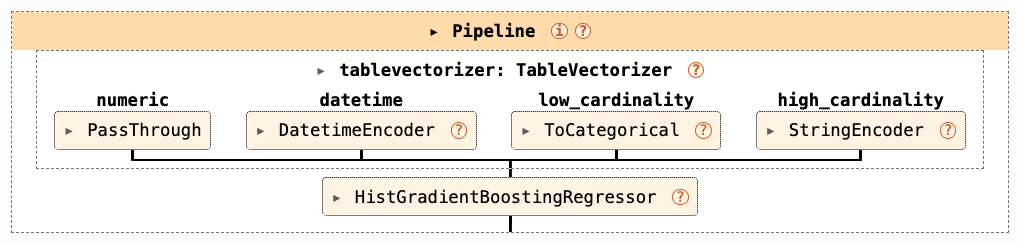
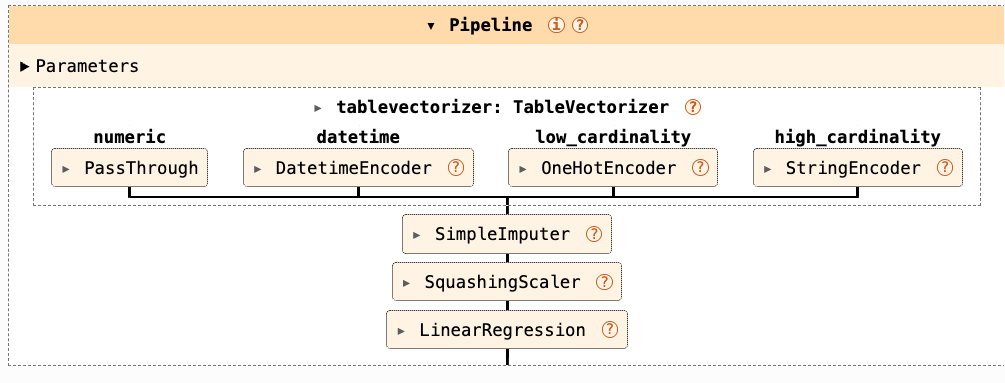
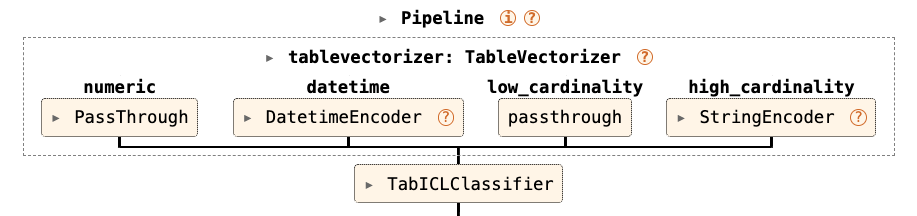
skrub’s tabular_pipeline returns a pipeline that includes all steps, with tuned defaults depending on the input model.
from skrub import tabular_pipeline
from tabicl import TabICLRegressor

# Option 1: Provide an estimator
model = tabular_pipeline(LogisticRegression())
model_tabicl = tabular_pipeline(TabICLRegressor())

# Option 2: Use preset strings
model_clf = tabular_pipeline("classification")
model_reg = tabular_pipeline("regression")
What the pipeline looks like: tree-based model
What the pipeline looks like: linear model
What the pipeline looks like: TabICL
Customizing the pipeline
Tip
This is not necessary most of the time!
from sklearn.decomposition import PCA
from sklearn.linear_model import Ridge
from sklearn.pipeline import make_pipeline
from skrub import tabular_pipeline
# Create a pipeline that includes two steps
model_pipeline = make_pipeline(PCA(n_components=20), Ridge())

# Pass the new model to tabular_pipeline
full_pipeline = tabular_pipeline(model_pipeline)
[name for name, _ in full_pipeline.steps]
['tablevectorizer', 'simpleimputer', 'squashingscaler', 'pca', 'ridge']Customizing the tabular_pipeline
Use tabular_pipeline if:
- You need a quick baseline for benchmarking/checking if there is a signal
- You want a starting point for experimentation
- You don’t need custom preprocessing/feature engineering
Embed a pipeline in tabular_pipeline if :
- You need to modify only the end of the pipeline
Use a manual pipeline if :
- You need fine-grained control over most of the transformations
- Your training process includes custom preprocessing steps
- You want to experiment with different transformers
Or… use the skrub Data Ops!
Example: Complete Workflow
That’s it!
What we have seen in this chapter
- Always use pipelines to prevent data leakage
TableVectorizerhandles most of the feature engineering- The
tabular_pipelineuses good defaults based on the type of estimator used - Pass a model (
LogisticRegression(),TabICLRegressor()), or a string (“regression”, “classification”) - Use manual pipelines to retain full control