from helpers import (
generate_data_with_outliers,
plot_feature_with_outliers
)
values = generate_data_with_outliers()
plot_feature_with_outliers(values)
Now that we can transform any column we want thanks to ApplyToCols, ApplyToFrame and the selectors, we can start covering the feature engineering part of our pipeline, beginning from numerical features.
Specifically, we will find out how to safely scale numerical features with the skrub SquashingScaler.
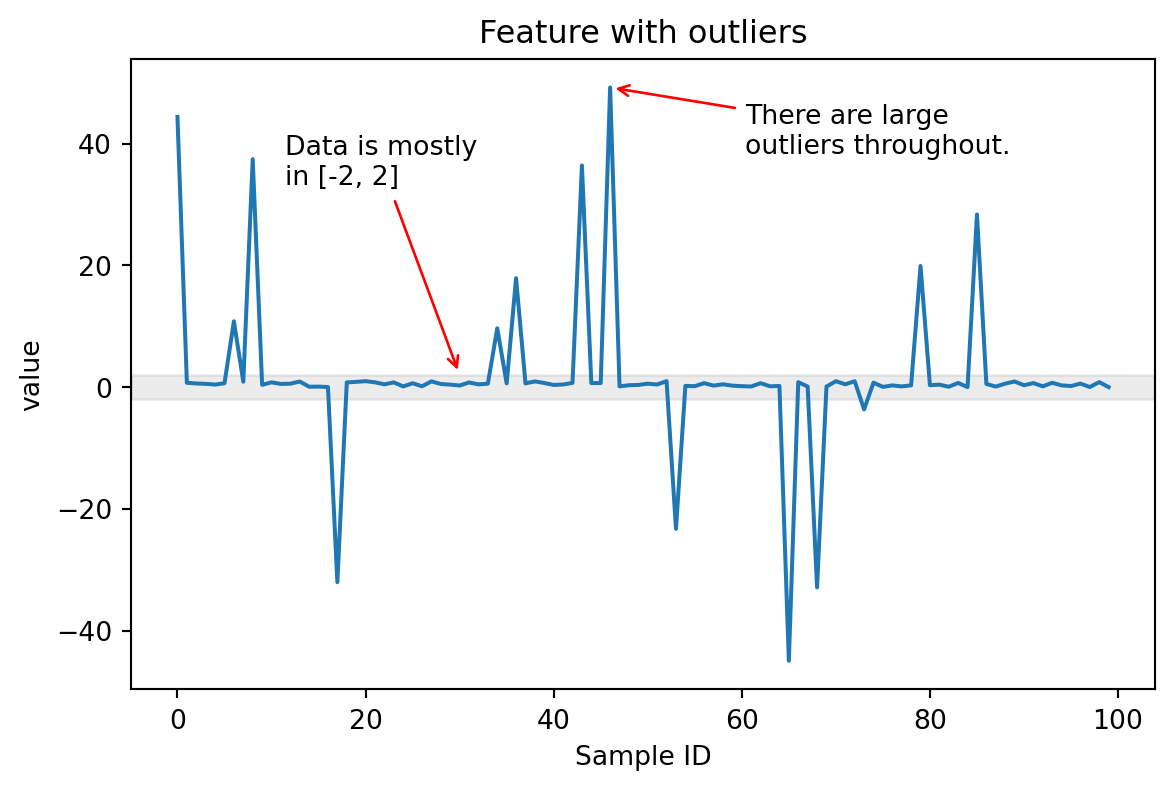
When dealing with numerical features that contain outliers (including infinite values), standard scaling methods can be problematic. Outliers can dramatically affect the centering and scaling of the entire dataset, causing the scaled inliers to be compressed into a narrow range.
Consider this example:

In this case, most of the values are in the range [-2, 2], but there are some large outliers in the range [-40, 40] that can cause issues when the feature needs to be scaled.
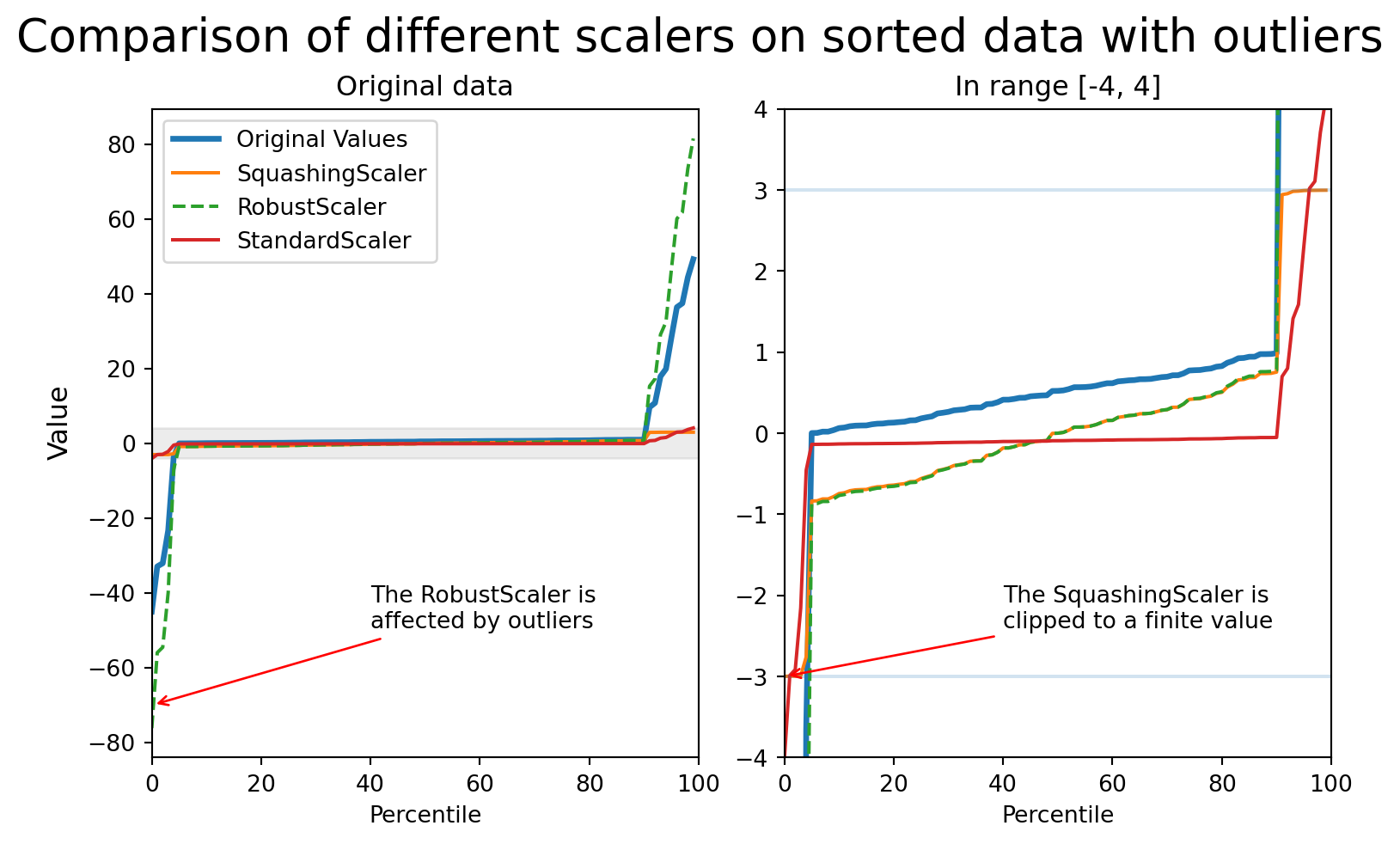
The StandardScaler computes mean and standard deviation across all values. With outliers present, these statistics become unreliable, and the scaling factor can become too small, squashing inlier values.
The RobustScaler uses quantiles (typically the 25th and 75th percentiles) instead of mean/std, which makes it more resistant to outliers. However, it doesn’t bound the output values, so extreme outliers can still have very large scaled values.
The SquashingScaler combines robust centering with smooth clipping to handle outliers effectively.
It works as following:
SquashingScalerThe SquashingScaler has various advantages over traditional scalers:
StandardScaler.A disadvantage of the SquashingScaler is that it is non-invertible: The soft clipping function is smooth but cannot be exactly inverted.
When compared on data with outliers:
If we plot the impact of each scaler on the result, this is what we can see:
---
title: "Scaling numerical features safely"
format:
html:
toc: true
revealjs:
slide-number: true
toc: false
code-fold: false
code-tools: true
---
## Introduction
Now that we can transform any column we want thanks to `ApplyToCols`, `ApplyToFrame`
and the selectors, we can start covering the feature engineering part of our
pipeline, beginning from numerical features.
Specifically, we will find out how to safely scale numerical features with the
skrub `SquashingScaler`.
## Numerical features with outliers
When dealing with numerical features that contain outliers (including infinite
values), standard scaling methods can be problematic. Outliers can dramatically
affect the centering and scaling of the entire dataset, causing the scaled inliers
to be compressed into a narrow range.
Consider this example:
```{python}
from helpers import (
generate_data_with_outliers,
plot_feature_with_outliers
)
values = generate_data_with_outliers()
plot_feature_with_outliers(values)
```
In this case, most of the values are in the range `[-2, 2]`, but there are some
large outliers in the range `[-40, 40]` that can cause issues when the feature
needs to be scaled.
### Regular scalers and their limitations
The **StandardScaler** computes mean and standard deviation across all values.
With outliers present, these statistics become unreliable, and the scaling factor
can become too small, squashing inlier values.
The **RobustScaler** uses quantiles (typically the 25th and 75th percentiles)
instead of mean/std, which makes it more resistant to outliers. However, it
doesn't bound the output values, so extreme outliers can still have very large
scaled values.
## SquashingScaler: A robust solution
The `SquashingScaler` combines robust centering with smooth clipping to handle
outliers effectively.
It works as following:
- It centers the median to 0, then it scales values using quantile-based statistics.
- It fills constant columns with 0s.
- It applies a smooth squashing function:
$x_{\text{out}} = \frac{z}{\sqrt{1 + (z/B)^2}}$
- It constrains all values to the range
$[-\texttt{max\_absolute\_value}, \texttt{max\_absolute\_value}]$ (default: 3)
- Infinite values are mapped to the corresponding boundaries.
- NaN values are kept unchanged.
### Advantages and disadvantages of `SquashingScaler`
The `SquashingScaler` has various advantages over traditional scalers:
- It is **outlier-resistant**: Outliers don't affect inlier scaling, unlike the
`StandardScaler`.
- It has **bounded output**: All values stay in a predictable range, ideal for
neural networks and linear models.
- It **handles edge cases**: The scaler works with infinite values and constant
columns.
- It **preserves missing data**: NaN values are kept unchanged.
A disadvantage of the `SquashingScaler` is that it is **non-invertible**:
The soft clipping function is smooth but cannot be exactly inverted.
## Conclusion
When compared on data with outliers:
- **StandardScaler** compresses inliers due to large scaling factors
- **RobustScaler** preserves relative scales but allows extreme outlier values
- **SquashingScaler** keeps inliers in a reasonable range while smoothly bounding
all values
If we plot the impact of each scaler on the result, this is what we can see:
```{python}
from helpers import scale_feature_and_plot
scale_feature_and_plot(values)
```