import pandas as pd
import numpy as np
from sklearn.pipeline import make_pipeline
from skrub import SelectCols, ApplyToCols, ApplyToFrame
from sklearn.preprocessing import OneHotEncoder, StandardScaler
import skrub.selectors as s
n_patients = 5
df = pd.DataFrame(
{
"patient_id": [f"P{i:03d}" for i in range(n_patients)],
"age": np.random.randint(18, 80, size=n_patients),
"sex": np.random.choice(["M", "F"], size=n_patients),
}
)
encode = ApplyToCols(OneHotEncoder(sparse_output=False), cols=s.string())
scale = ApplyToCols(StandardScaler(), cols=s.numeric())8 Quiz: Column-level transformations
9 Column transformers
9.1 Question 1
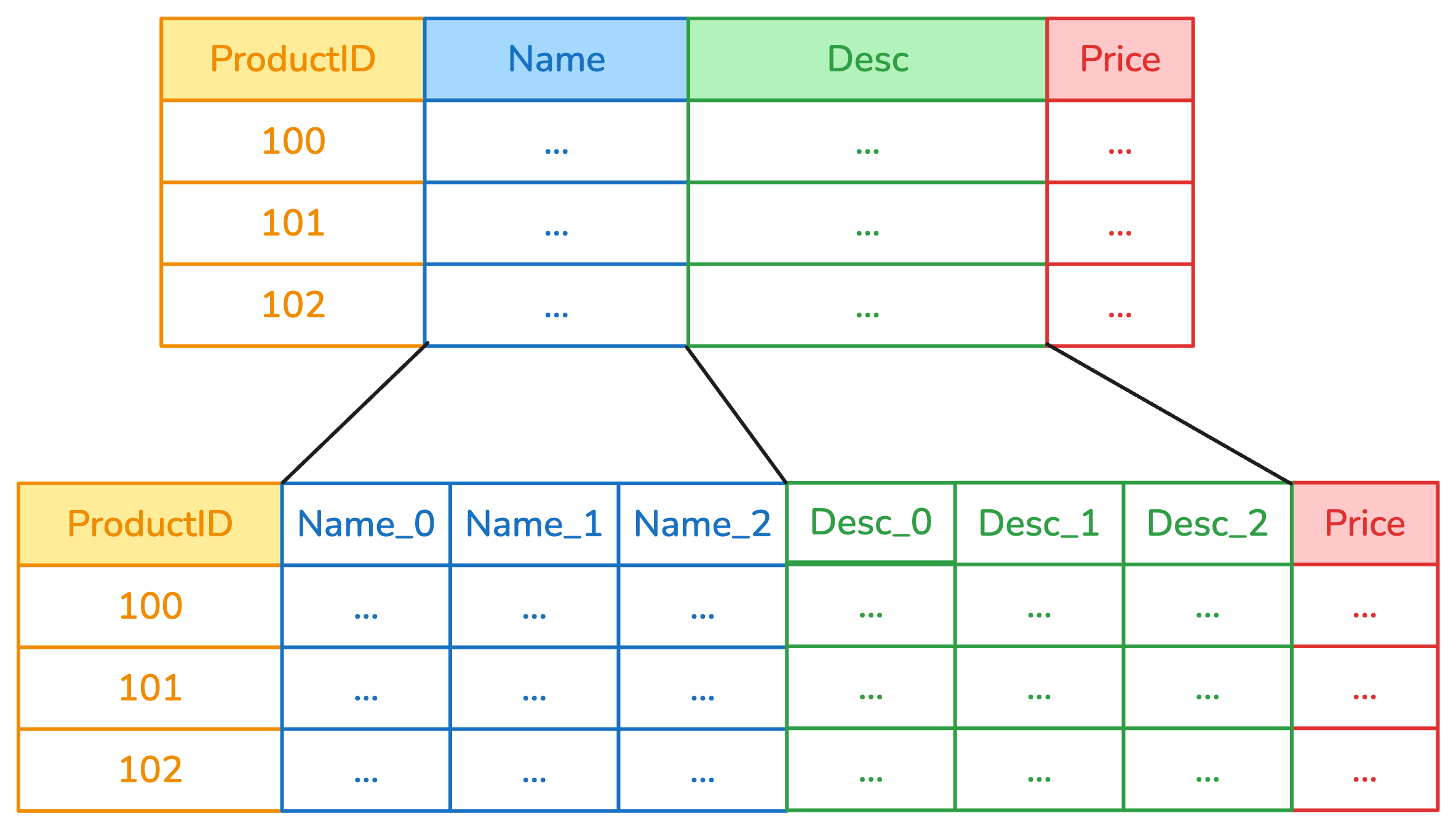
Consider this diagram. Which column transformer can replicate this behavior if it wraps a OneHotEncoder?
TipSolution
Answer: A) ApplyToCols takes a transformer, then clones it and applies it separately to each column under selection (in this case, Name and Desc). Columns that were not selected are left unchanged.
9.2 Question 2
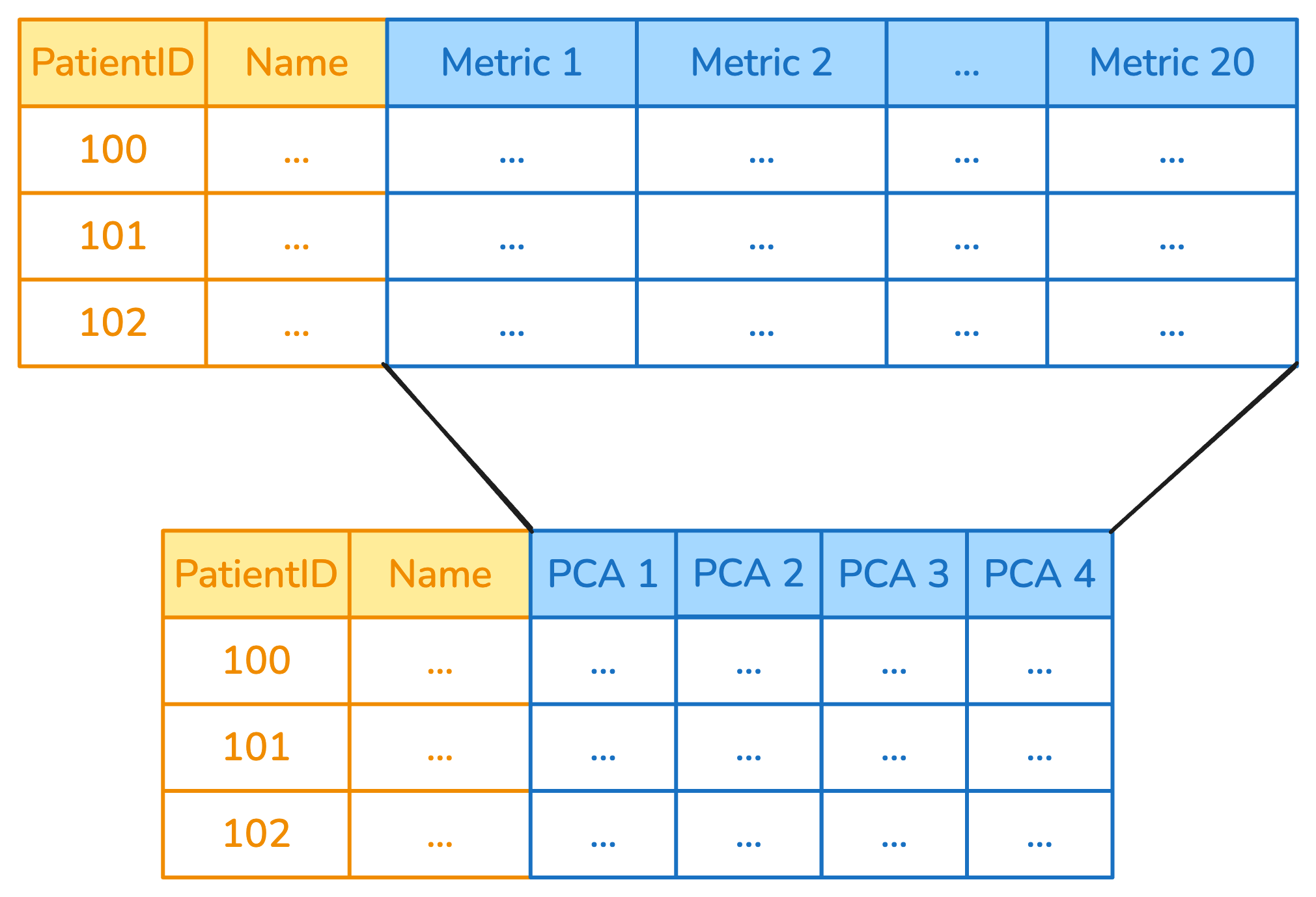
Consider this diagram. Which column transformer can replicate this behavior if it wraps a PCA?
TipSolution
Answer: B) ApplyToFrame takes a transformer and a list of columns (usually, a subset of the columns in the dataframe), then applies the transformer to all the selected columns at once, replacing them with the output of the transfromer. Columns that were not selected are left unchanged.
9.3 Question 3
TipSolution
Answer: False.
The order of the operations matters, and a different order leads to different results.
case_1 = make_pipeline(encode, scale)
df_1 = case_1.fit_transform(df)
df_1.head(5)| patient_id_P000 | patient_id_P001 | patient_id_P002 | patient_id_P003 | patient_id_P004 | age | sex_F | sex_M | |
|---|---|---|---|---|---|---|---|---|
| 0 | 2.0 | -0.5 | -0.5 | -0.5 | -0.5 | -0.368230 | 0.5 | -0.5 |
| 1 | -0.5 | 2.0 | -0.5 | -0.5 | -0.5 | -1.657034 | 0.5 | -0.5 |
| 2 | -0.5 | -0.5 | 2.0 | -0.5 | -0.5 | 0.368230 | -2.0 | 2.0 |
| 3 | -0.5 | -0.5 | -0.5 | 2.0 | -0.5 | 1.380862 | 0.5 | -0.5 |
| 4 | -0.5 | -0.5 | -0.5 | -0.5 | 2.0 | 0.276172 | 0.5 | -0.5 |
case_2 = make_pipeline(scale, encode)
df_2 = case_2.fit_transform(df)
df_2.head(5)| patient_id_P000 | patient_id_P001 | patient_id_P002 | patient_id_P003 | patient_id_P004 | age | sex_F | sex_M | |
|---|---|---|---|---|---|---|---|---|
| 0 | 1.0 | 0.0 | 0.0 | 0.0 | 0.0 | -0.368230 | 1.0 | 0.0 |
| 1 | 0.0 | 1.0 | 0.0 | 0.0 | 0.0 | -1.657034 | 1.0 | 0.0 |
| 2 | 0.0 | 0.0 | 1.0 | 0.0 | 0.0 | 0.368230 | 0.0 | 1.0 |
| 3 | 0.0 | 0.0 | 0.0 | 1.0 | 0.0 | 1.380862 | 1.0 | 0.0 |
| 4 | 0.0 | 0.0 | 0.0 | 0.0 | 1.0 | 0.276172 | 1.0 | 0.0 |
10 Selectors
For the following questions, refer to this example dataframe:
import pandas as pd
import datetime

data = {
    "age": [25, 34, 29, 42, 31],
    "salary": [45000.0, 52000.0, 61000.0, None, 48000.0],
    "employment_type": ["full-time", "part-time", None, "contract", "full-time"],
    "job_title": ["engineer", "analyst", "consultant", "designer", "developer"],
    "department_title": ["IT", "Finance", "Consulting", "Design", "Development"],
    "is_remote": [False, True, False, True, False],
    "performance_rating": pd.Categorical(["excellent", None, "good", "excellent", "average"]),
    "bonus_category": pd.Categorical(["5K+", "10K+", "15K+", "7K+", "12K+"]),
    "hire_date": [
        datetime.datetime.fromisoformat(dt)
        for dt in [
            "2018-06-01T09:00:00",
            "2019-09-15T14:30:00",
            "2020-11-20T10:15:00",
            "2021-04-10T16:45:00",
        ]
    ]
    + [None],

}
df = pd.DataFrame(data)
df| age | salary | employment_type | job_title | department_title | is_remote | performance_rating | bonus_category | hire_date | |
|---|---|---|---|---|---|---|---|---|---|
| 0 | 25 | 45000.0 | full-time | engineer | IT | False | excellent | 5K+ | 2018-06-01 09:00:00 |
| 1 | 34 | 52000.0 | part-time | analyst | Finance | True | NaN | 10K+ | 2019-09-15 14:30:00 |
| 2 | 29 | 61000.0 | None | consultant | Consulting | False | good | 15K+ | 2020-11-20 10:15:00 |
| 3 | 42 | NaN | contract | designer | Design | True | excellent | 7K+ | 2021-04-10 16:45:00 |
| 4 | 31 | 48000.0 | full-time | developer | Development | False | average | 12K+ | NaT |
10.1 Question 4
TipSolution
Answer: B)
t.fit_transform(df)| salary | |
|---|---|
| 0 | 45000.0 |
| 1 | 52000.0 |
| 2 | 61000.0 |
| 3 | NaN |
| 4 | 48000.0 |
10.2 Question 5
TipSolution
Answer: C)
t.fit_transform(df)| salary | job_title | department_title | |
|---|---|---|---|
| 0 | 45000.0 | engineer | IT |
| 1 | 52000.0 | analyst | Finance |
| 2 | 61000.0 | consultant | Consulting |
| 3 | NaN | designer | Design |
| 4 | 48000.0 | developer | Development |